

rent-now

Rent More, Save More! Use code: ECRENTAL

5% off 1 book, 7% off 2 books, 10% off 3+ books

9781592008186

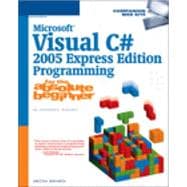
Microsoft Visual C# 2005 Express Edition Programming For The Absolute Beginner

by Bakharia, Aneesha
  • ISBN13:

    9781592008186

  • ISBN10:

    1592008186

  • Format: Paperback
  • Copyright: 2005-12-21
  • Publisher: Cengage Learning PTR
  • Purchase Benefits
  • Free Shipping Icon Free Shipping On Orders Over $35!
    Your order must be $35 or more to qualify for free economy shipping. Bulk sales, PO's, Marketplace items, eBooks and apparel do not qualify for this offer.
  • eCampus.com Logo Get Rewarded for Ordering Your Textbooks! Enroll Now
List Price: $29.99

Summary

Microsoft Visual C# 2005 Express Edition Programming for the Absolute Beginner provides beginner programmers with programming instruction using Visual C# 2005 Express Edition as a foundation language. Written for the entry-level, non-professional programmer, the book assumes no prior programming or scripting experience. Written in a straight-forward style, using a games-based approach that makes learning beginning-level programming fun and easy, Microsoft Visual C# 2005 Express Edition Programming for the Absolute Beginner is the perfect introductory programming book.

Table of Contents

Introduction xvii
Getting Started with Visual C# Express
1(18)
Project Preview: The Picture Viewer
2(1)
Installing Visual C# Express
3(1)
Creating a Visual Hello World Application
4(8)
Creating a Console Hello World Application
12(2)
Back to the Picture Viewer Application
14(3)
Designing the Interface
14(1)
Adding the C# Code
15(2)
Testing the Application
17(1)
Summary
17(1)
Challenges
17(2)
C# Basics
19(24)
Project Preview: Math Game
20(1)
C# Syntax
21(2)
Debugging C# Syntax Errors
23(1)
Basic Arithmetic
24(1)
Expressions and Operator Precedence
25(1)
Variables
25(4)
Declaring Whole Numbers and Fractions
27(1)
Strings
28(1)
Booleans
29(1)
Constants
29(1)
Writing Documentation
29(1)
Back to the Math Game
30(10)
Designing the Interface
31(2)
Adding the C# Code
33(7)
Testing the Application
40(1)
Summary
41(1)
Challenges
41(2)
Controlling Code Flow
43(22)
Project Preview: The SeeSharp Quiz
43(2)
Making Decisions
45(7)
Comparison Operators
45(1)
Logical Operators
46(1)
The if Statement
47(1)
The else Clause
48(1)
The else if Clause
49(3)
Loops
52(6)
The for Loop
52(2)
The while Loop
54(2)
Exiting a Loop
56(2)
Back to the SeeSharp Quiz Application
58(5)
Designing the Interface
58(2)
Adding the C# Code
60(3)
Testing the Application
63(1)
Summary
63(1)
Challenges
64(1)
Designing a User Interface
65(26)
Project Preview: The Online Psychiatrist
65(1)
Designing Forms
66(4)
Adding Controls to a Form
70(1)
Selecting a Group of Controls
71(4)
Aligning and Spacing Controls
72(2)
Setting Properties for Multiple Controls
74(1)
Label Control
75(1)
TextBox Control
76(2)
Multiline Text Boxes
78(2)
Entering a Password
78(2)
Button Control
80(2)
GroupBox Control
82(1)
CheckBox Control
82(1)
RadioButton Control
83(1)
ListBox Control
84(2)
ComboBox Control
86(1)
Back to the Online Psychiatrist
86(3)
Designing the Interface
86(2)
Programming the C# Code
88(1)
Testing the Game
88(1)
Summary
89(1)
Challenges
89(2)
Strings, Random Numbers, and Arrays
91(28)
Project Preview: Generating Word Finder Puzzles
92(1)
Strings
93(1)
Special Characters in Strings
94(5)
Finding the Length of a String
96(1)
Converting Numbers to a String
96(1)
Joining Strings
96(1)
Changing the Case of a String
97(1)
String Comparison
97(1)
Search for and Replace String Data
97(1)
Trim and Pad Strings
98(1)
Mathematics
99(1)
Generating Random Numbers
100(1)
Arrays
100(4)
Sorting an Array
102(1)
Multidimensional Arrays
102(2)
Back to the Word Finder Puzzle Generator
104(14)
Designing the Interface
104(1)
Adding the C# Code
105(12)
Testing the Application
117(1)
Summary
118(1)
Challenges
118(1)
Drawing Graphics and Building Games
119(20)
Project Preview: The Pong Game
120(1)
The Graphics Class
121(7)
The Pen Class
124(1)
The Font Class
124(1)
The Brush Class
125(3)
Working with Images
128(1)
Drawing Lines
128(1)
Drawing Rectangles
129(1)
Drawing Ellipses
130(1)
Animation and Collision Detection
131(2)
Moving an Object with a Mouse
133(1)
Back to the Pong Game
134(3)
Designing the Interface
135(1)
Programming the C# Code
135(2)
Testing the Game
137(1)
Summary
137(1)
Challenges
138(1)
Designing Advanced Windows Forms Applications
139(22)
Project Preview: Sharp Painting---A Drawing Application
140(1)
Windows Forms Controls---A Recap
140(2)
The Timer Control
142(1)
Tabbed Dialog Boxes
143(2)
The TreeView Control
145(1)
Adding a Menu
146(2)
The ToolStrip Control
148(2)
Back to the Sharp Painting Application
150(10)
Designing the Interface
150(1)
Programming the C# Code
151(8)
Testing the Application
159(1)
Summary
160(1)
Challenges
160(1)
Object-Oriented Programming for the Absolute Beginner
161(12)
What Is Object-Oriented Programming?
162(1)
Classes and Objects
163(2)
Creating an Employee Class
165(2)
Constructors
167(1)
Static Variables
167(1)
Overloaded Methods
168(1)
Creating Properties
169(1)
Using Namespaces
170(2)
Summary
172(1)
Challenges
172(1)
Working with Databases
173(24)
Project Preview: The Guess A Word Game
174(1)
What Is a Database?
174(2)
Creating a Database with Microsoft Access
176(4)
Querying a Database
180(1)
Creating a Database Connection in Visual C# 2005 Express Edition
181(2)
Displaying Data with the DataGridView Control
183(2)
Displaying Search Results in a DataGridView Control
185(1)
Binding Data to Form Controls
186(1)
Using C# Code to Retrieve Data from a Database
187(1)
Back to the Guess A Word Game
188(1)
Designing the Database
189(6)
Designing the Interface
189(2)
Adding the C# Code
191(4)
Testing the Application
195(1)
Summary
195(1)
Challenges
195(2)
Error Handling and Debugging
197(24)
Project Preview: The Tic-Tac-Toe Game
198(1)
Types of Errors: Syntax, Runtime, and Logical
199(1)
Debugging
200(7)
Adding Debug Statements to Code
201(1)
Setting a Breakpoint
202(2)
Monitoring Variables
204(2)
Stepping Through Code with the Debug Toolbar
206(1)
Structured Error Handling
207(4)
Handling Specific Exceptions
209(1)
Ordering Multiple Exceptions
210(1)
Back to the Tic-Tac-Toe Game
211(8)
Understanding the Interface
211(2)
Understanding the C# Code
213(1)
Debugging the Game
213(6)
Summary
219(1)
Challenges
220(1)
Reading and Writing Files
221(24)
Project Preview: The Rich Text Editor
222(2)
The System.IO Namespace
224(1)
Displaying File and Folder Information
225(1)
Reading a File
225(1)
Storing Data in a File
226(1)
Appending Data to a File
227(1)
Using Dialog Boxes to Create a Simple Text Editor
227(6)
Designing the Interface
227(3)
The Open File Dialog Box
230(1)
The Save Dialog Box
230(3)
Copying, Moving, and Deleting Files
233(1)
Creating, Moving, and Deleting Folders
234(1)
Listing Directories
234(1)
Listing Drives
235(1)
Back to the Rich Text Editor Application
235(9)
Designing the Interface
237(2)
Adding the C# Code
239(4)
Testing the Application
243(1)
Summary
244(1)
Challenges
244(1)
Appendix A C# and ASP.NET Web Sites
245(2)
C# Web Sites
245(1)
Open Source C# Software
246(1)
ASP.NET Web Sites
246(1)
Index 247

Supplemental Materials

What is included with this book?

The New copy of this book will include any supplemental materials advertised. Please check the title of the book to determine if it should include any access cards, study guides, lab manuals, CDs, etc.

The Used, Rental and eBook copies of this book are not guaranteed to include any supplemental materials. Typically, only the book itself is included. This is true even if the title states it includes any access cards, study guides, lab manuals, CDs, etc.

Rewards Program